



Remus Stealer Uses a Fake Google Sheets Extension to Steal Gmail Messages
Research from Invoke RE and Gen Threat Labs identifies a malicious Chrome extension that uses the victim’s existing Gmail session, clarifying the browser component behind Remus’s persistence claims.
Remus Stealer is distributing a Chrome extension disguised as Google Sheets to collect messages from Gmail, according to new findings published by Invoke RE. The extension reads mail through the browser’s existing login session and sends message contents to an attacker-controlled endpoint.
The finding adds a concrete browser component to a question Hudson Rock raised earlier this month: how could a stealer claim continued mailbox access after its original executable had finished running?
An extension left inside the compromised Chrome profile could perform later collection. Its presence would also mean that securing the Google account and cleaning the endpoint are both necessary parts of the response.
01 / What has changed
From a persistence claim to a browser component
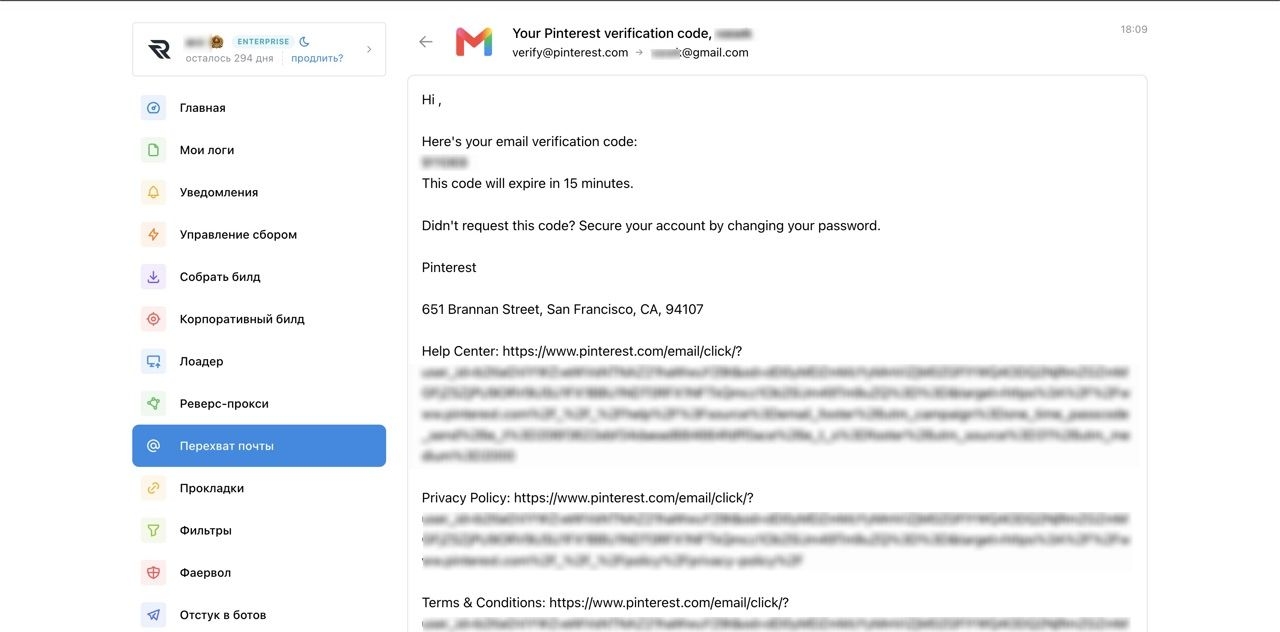
In our November 9 investigation, Hudson Rock examined Remus’s mailbox-access marketing and questioned its developer and a self-described customer. The developer described interaction with browser memory and an executable that runs and exits. The customer claimed mailbox access continued after browser closure and a password change.
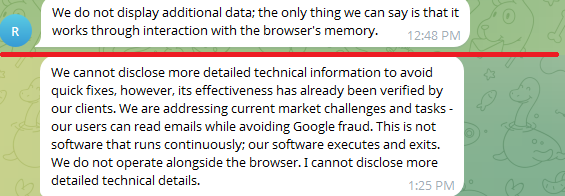
We distinguished those claims from demonstrated behavior. The material did not establish a Gmail zero-day or show newly arriving mail being retrieved after comprehensive account recovery. Another component remaining on the endpoint was one of the possibilities left open.
The technical reporting now identifies such a component: an unpacked Chrome extension deployed by Remus. This explains how collection could continue after the native executable exits. Linking this exact implementation to every earlier customer claim would still require matching samples and testing.
02 / Extension findings
A fake productivity extension inside the browser
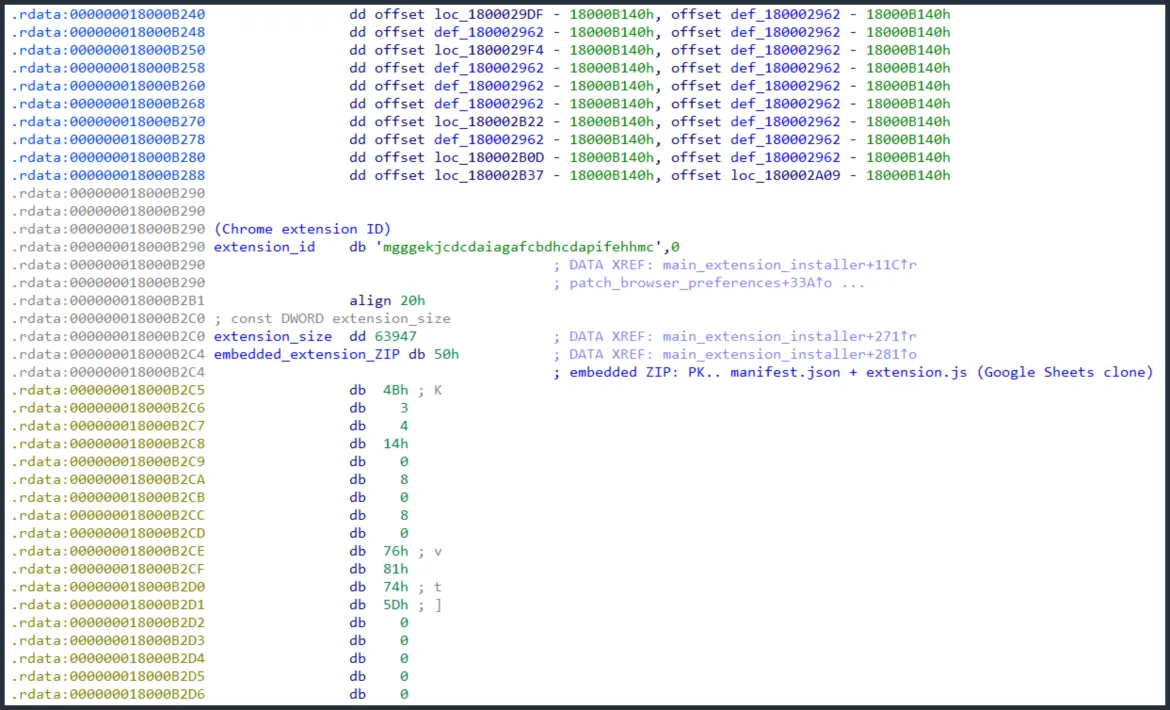
According to Invoke RE, Remus drops a ZIP archive into the Windows temporary directory, extracts it with PowerShell’s Expand-Archive, and then backs up and modifies Chrome’s Secure Preferences to register the unpacked extension and enable developer mode.
The extension calls itself Google Sheets, carries version 0.5.4, and uses a description about editing documents offline. Invoke RE reports no spreadsheet interface. Its relevant components are a background service worker, the storage and alarms permissions, and host access covering <all_urls>.
We've observed Remus Stealer distributing a Gmail stealer Chrome extension masquerading as Google Sheets.
Invoke RE (@InvokeReversing) November 24, 2026
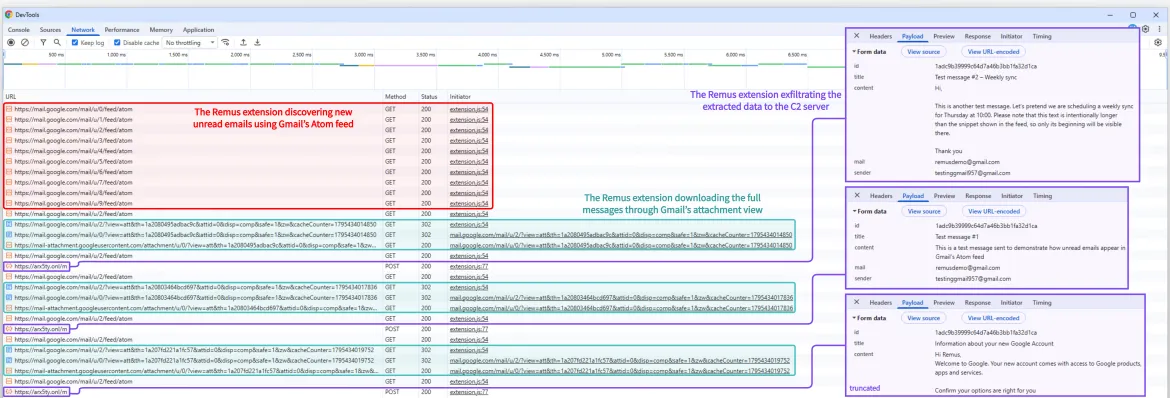
The extension reads Gmail using the browser’s existing login session and posts message contents back to the attacker. A few details of our analysis:
Source: Gen Threat Labs, Figure 6.
- Deploy the extensionRemus extracts the archive under
%TEMP%and modifies Chrome’s profile configuration. - Use the signed-in browserThe extension sends Gmail requests using the browser’s existing session credentials.
- Check for messagesA reported one-minute loop checks account slots
0through9through the unread Atom feed, then fetches individual messages. - Send the contents outThe sender, subject, and body are extracted and posted to
hxxps://prem1um[.]onl/m.
Invoke RE also reports that the same domain appears in the native Remus command-and-control configuration. That is a useful connection between the native malware and the extension’s collection endpoint.
03 / Technical assessment
The authenticated browser does the work
The reported design is technically consistent with Chrome’s extension model. Google documents that an extension service worker with appropriate host permissions can make cross-origin network requests. Chrome also documents conditions under which requests to permitted hosts can carry the site’s session cookies.
This distinction matters: asking the browser to make an authenticated request does not require the extension to first export the browser’s cookie database. The cookies API permission governs direct access through that API; its absence from the reported permission list does not rule out requests authenticated by the browser. Actual success still depends on the implementation, browser settings, and account state.
Source: Gen Threat Labs, Figure 15.
The collection also occurs after the user has authenticated. It does not demonstrate a broken Google MFA challenge. If stolen messages contain recovery links or email-delivered verification codes, those messages could help attackers compromise other services, depending on their controls.
A service worker need not stay awake continuously
Chrome can stop an idle extension service worker and restart it when an event arrives. The alarms API supports scheduled work. A one-minute polling interval therefore fits periodic collection, but browser scheduling and device sleep can delay execution.
This is a plausible way for collection to outlive the original Remus process. It does not establish continued collection while Chrome and its background processes are fully stopped. Messages already copied to an attacker panel could remain visible regardless of whether any new mail is being collected.
Installation evidence and remaining coverage limits
Google’s Gmail inbox-feed documentation describes a read-only feed for new-message alerts and specifies Google Workspace accounts. The reported use of a browser session needs sample-level testing before coverage can be generalized to every consumer Gmail account or Workspace configuration.
Chrome’s protected-preference design includes integrity checks. Gen’s module analysis addresses this installation detail. Earlier research by Synacktiv documents extension registration through preference-file and integrity-metadata changes. These protections should not be treated as a substitute for endpoint remediation, and installation behavior should not be generalized across all browser versions and policies.
04 / What persistence means here
A password reset can leave the extension behind
Google says a password change or reset signs users out broadly, with specified exceptions. The presence of this extension does not show that an effectively revoked Google session remains usable.
The local problem can nevertheless survive. Gen’s analysis concludes that effective session revocation stops interception; a later sign-in can restore access while the extension remains installed. Hudson Rock has not independently reproduced this behavior.
| Claim or condition | What the extension could explain | Evidence limit |
|---|---|---|
| Original executable exits | A separate browser component performs later collection. | That this exact extension explains all earlier advertised behavior. |
| Password changes | The installed extension remains and may resume after the user signs in again. | The mechanism requires usable authentication; revoked-session access is not established. |
| Browser closes | Previously stolen messages remain in the panel. Closing windows may leave background processes. | Collection of new messages while all Chrome processes are stopped. |
| Account and endpoint recovered | The extension model highlights why both sides need remediation. | Continued fresh-mail collection after verified removal and effective access revocation. |
A decisive test would track a newly created message delivered after recorded recovery steps, distinguish it from previously collected mail, and establish whether the compromised browser was reauthenticated. The new findings narrow the mechanism under investigation; they do not establish the seller’s strongest recovery-resistance claims.
05 / Hunting indicators
Look for the extension and its installation trail
Use the following reported indicators as investigative leads, preserving their source attribution. Correlate the name and permissions with extension IDs, installation paths, process activity, and network evidence.
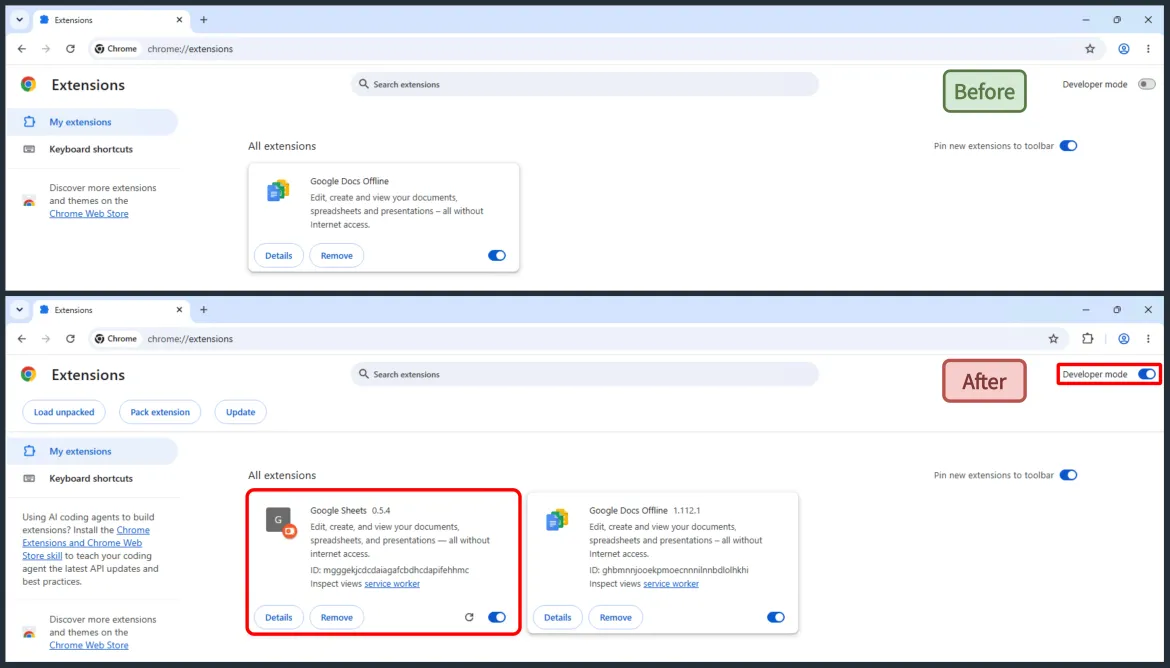
Source: Gen Threat Labs, Figure 10.
| Indicator | Reported value or behavior |
|---|---|
| Extension IDs | cfmepkojgnkahbmgablgdahdomjdppgf (Invoke RE and Gen)mgggekjcdcdaiagafcbdhcdapifehhmc (Gen) |
| Display name / version | Google Sheets / 0.5.4 |
| Message destination | hxxps://prem1um[.]onl/m |
| Domain relationship | prem1um[.]onl also appears in the native Remus C2 configuration. |
| Archive path | %TEMP%\cfmepkojgnkahbmgablgdahdomjdppgf.zip |
| Unpacked directory | %TEMP%\cfmepkojgnkahbmgablgdahdomjdppgf\ |
| Profile changes | Backup and modification of Secure Preferences, unpacked-extension registration, and developer mode enabled. Gen also identifies Preferences and .bak backups. |
| Collection behavior | Checks account slots 0 to 9 on a reported one-minute interval; retrieves message sender, subject, and body. |
| Artifact | Published SHA-256 |
|---|---|
| Interception module (x64 DLL) | 2d92fe0b3b918bdbca318879a65bd5a00e63e00b181085afdeed6922c85f90bde13e019dae958f20d7a252adf64888ab6e6c427622b67c5bf7ae6ffa4a0e25f3 |
| Extension archive (ZIP) | 75e5225cb2fca8b62718648e0c663b9003048a19860ae9f0458f7d904220e69339cb29f0985fa58d6b4f632948d543c3633e0a8ab1a51a360a813f2752eb082f |
| Extension JavaScript | ae9556b371d29e5fd1f7ff45c00fb60644d6cd8c5bfc1b78a565c1f6296f3a81acf1b83914aca2944f55be6ff269cc984f35e3a757a12d9cd036e428c93087bc |
Keep each indicator’s provenance. Do not infer a one-to-one mapping between these hashes, extension IDs, and the endpoint reported by Invoke RE.
Correlate several signals
- Installation sequence: A suspicious process launches PowerShell to unpack an archive under
%TEMP%, followed by unexpected Chrome profile-file writes and a newly registered extension. - Profile inspection: An extension claiming to be Google Sheets loads from a temporary directory, with broad host access and unexpected developer-mode changes. Inspect every affected Chrome profile.
- Network activity: Requests to the reported destination are stronger evidence than the display name alone. DNS or hostname telemetry can identify the domain; seeing the HTTPS
/mpath requires suitable endpoint or decrypted HTTP telemetry.
Developer mode, PowerShell, and unpacked extensions also have legitimate uses. A single generic signal is not a Remus verdict. An exact ID match is a useful lead, but hunting should also cover behavior and artifacts that may change between builds.
06 / Response
Recover the account and the browser together
For a confirmed infection, Hudson Rock recommends treating the extension as part of the endpoint compromise and investigating the mailboxes accessible through that profile.
- Isolate the endpoint and preserve evidence. Retain the archive, extracted extension, profile configuration, and relevant process and network records before remediation.
- Secure accounts from a trusted device. Change exposed passwords, review and revoke affected sessions and suspicious application access, and inspect recovery settings. Begin account protection promptly while the endpoint investigation proceeds.
- Remediate the full infection. Remove the malicious extension and address the native malware and any other persistence. Rebuild the host where appropriate. Resume trusted sign-ins only after the affected environment is remediated.
- Review mailbox and dependent-account exposure. Check unauthorized forwarding, filters, delegation, and security activity. Assess services whose recovery links or verification messages may have been collected. Retain strong MFA as part of account protection.
- Strengthen browser management. Review extension installation controls and restrict developer mode where it is unnecessary. Google’s policies support managed extension restrictions and control of extension developer mode. Verify enforcement in the environment.
Google’s compromised-account guidance provides the relevant account and mailbox checks. Browser policies reduce exposure, but confirmed local malware still requires endpoint remediation.
Evidence and attribution
What this update establishes
This update combines Hudson Rock’s earlier reporting, Invoke RE’s observations, Gen Threat Labs’ technical analysis, and official documentation. The Invoke RE lead post was independently retrieved; its detailed observations were reviewed from a copy of the thread. Technical findings and sample identifiers remain attributed to their respective researchers.
Published identifiers provide targets for further acquisition; they do not mean Hudson Rock possesses or has examined the corresponding files. We have not independently recovered this Gmail module or reproduced its behavior. No malware was executed or installed, and no attacker infrastructure was contacted during our investigation.
Independent follow-up should verify the published files, preserve the extracted extension including manifest.json and its worker files, record browser and operating-system versions, and track newly delivered messages through sign-out, revocation, full browser shutdown, and later sign-in. This article does not present a controlled test covering every recovery scenario.
Sources and research credit
- Invoke RE: Remus Gmail-stealing Chrome extension thread, November 24, 2026. Author: invokere.com. Credit for the extension findings and indicators attributed to this thread.
- Gen Threat Labs: Remus email-interception analysis, by Vojtěch Krejsa and Jan Rubín, November 24, 2026.
- Hudson Rock: Remus Stealer Markets Persistent Gmail Access, November 9, 2026.
- Chrome for Developers: Cross-origin requests, storage and cookies, service-worker lifecycle, and alarms.
- Google: Gmail inbox feed, password changes, and compromised-account recovery.
- Synacktiv: The Phantom Extension, by Riadh Bouchahoua, September 23, 2025. Background on Chrome preference protections.
- Chromium: Tracked preferences and ExtensionDeveloperModeSettings. Google: Chrome extension policies.