


Hudson Rock Research / Infostealer Marketplaces
Inside the AI-Powered Marketplace Turning Infected Computers Into Searchable Profiles
A newly advertised service turns compromised computers into searchable profiles. Hudson Rock analyzed several logs offered for sale and identified them within its own database.
A new service advertised on cybercrime forums is adding a layer of interpretation to the sale of infostealer logs. The reviewed listings present each computer with a description of its apparent owner, workplace, applications, and potentially valuable data. Buyers can search those descriptions using natural language and combine the results with filters such as country, operating system, and price.
The result is a catalog in which a compromised machine can be presented as a clinic’s reception desk, a defense contractor’s household computer, or a government employee’s family workstation. The service is marketing the context around the stolen data as part of the product.
The pitch: a description attached to every stolen log
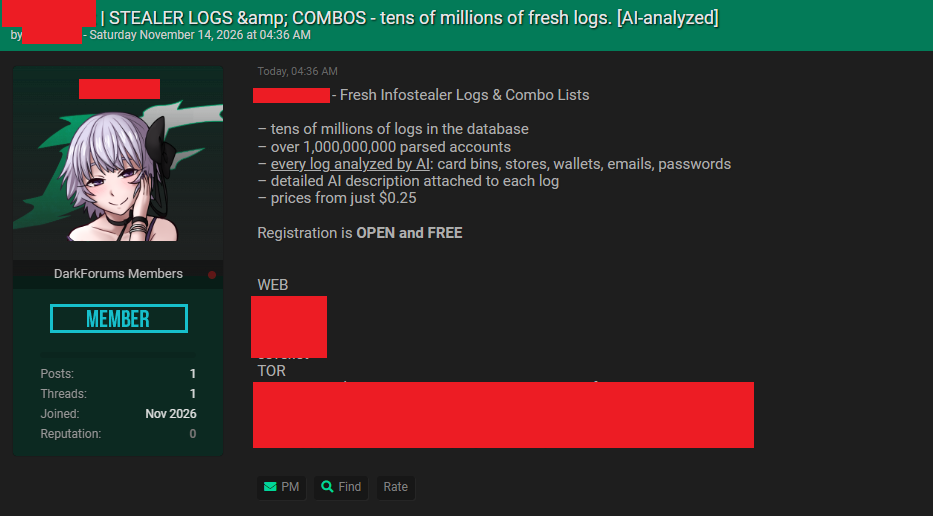
A forum advertisement dated November 14, 2026 promotes a marketplace for infostealer logs and account combinations. The operator claims a database containing tens of millions of logs, more than one billion parsed accounts, and AI analysis of every log, with prices starting at $0.25.
Those inventory figures, coverage claims, and starting prices are the operator’s assertions. The screenshots do, however, show an interface with detailed computer descriptions, an AI-labeled search tab, and individual listings offered for sale.
Searching for what a computer is used for
The clearest example is a query visible in the marketplace’s AI search tab: “citrix access to healthcare provider.” The displayed result is a $10 listing titled “The Ophthalmology Clinic Front Desk Dump.” Its description characterizes the machine as a Canadian clinic workstation and refers to medical software, billing activity, and Citrix VPN credentials.
This shows the intended function of the search feature: connecting a description of the kind of machine or business context a buyer wants with a profile attached to a stolen log. The screenshot shows the query and result; it does not reveal the model, search architecture, or accuracy of the system.
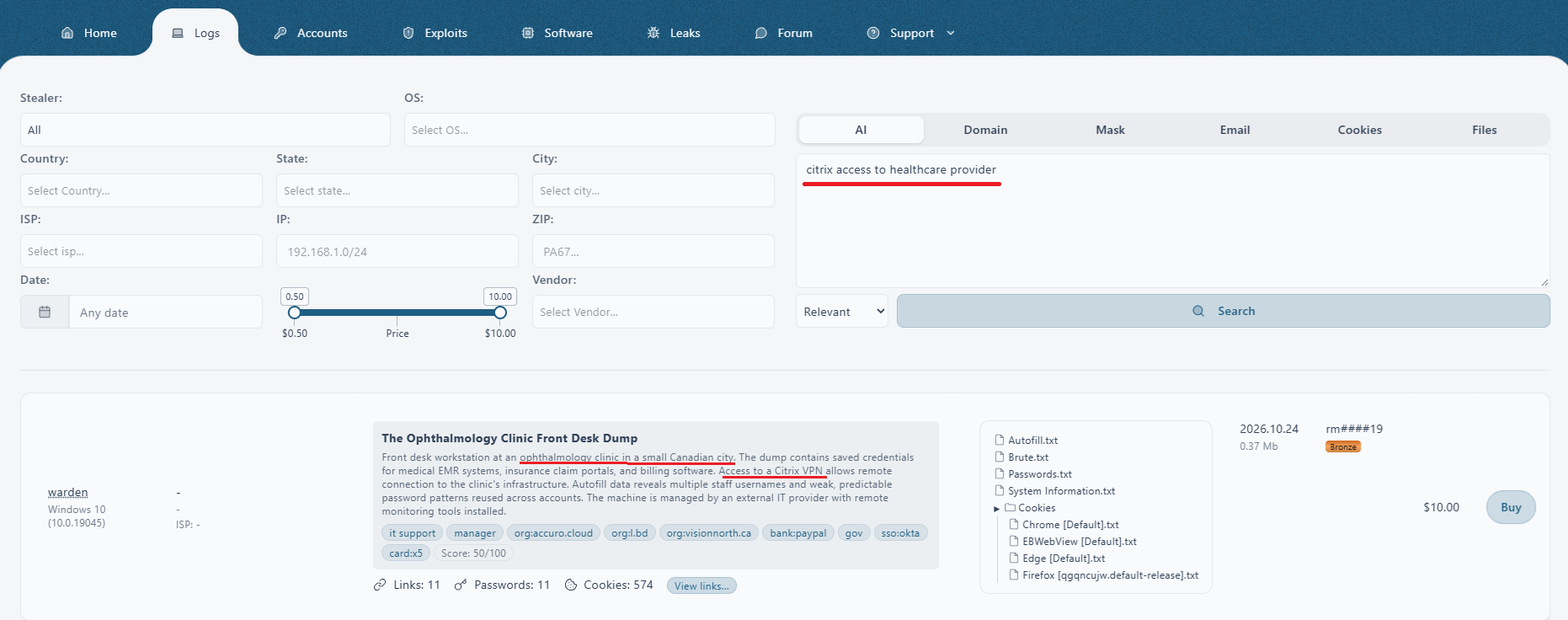
The surrounding filters include country, state, city, ISP, IP, ZIP code, stealer family, operating system, date, price, and vendor. Other tabs offer searches by domain, mask, email, cookies, and files. Geographic and technical filtering can therefore sit alongside the machine’s descriptive profile.
The listings also include tags and numerical scores. These labels can influence how buyers judge a machine, but the screenshots provide no methodology for the scores. A profile’s confidence or detail should not be mistaken for independently verified employment, access, or business impact.
Hudson Rock matches the advertised data in Cavalier
Hudson Rock’s analysis connected several logs offered by the service to records already in its infostealer database. The clinic listing provides a particularly clear example because the marketplace exposes a distinctive artifact in its file preview.
Among the listed browser-cookie files is a Firefox profile containing the identifier qgqncujw. The same identifier appears in a matching cookie-file path returned by Cavalier’s File Search.
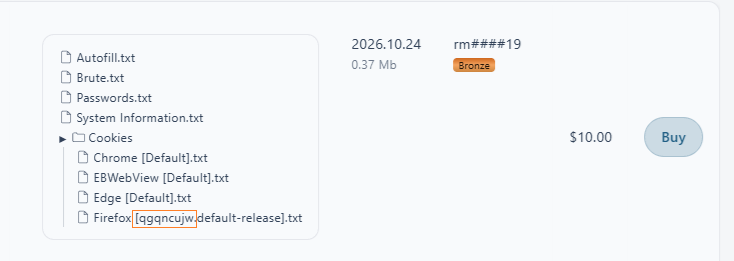
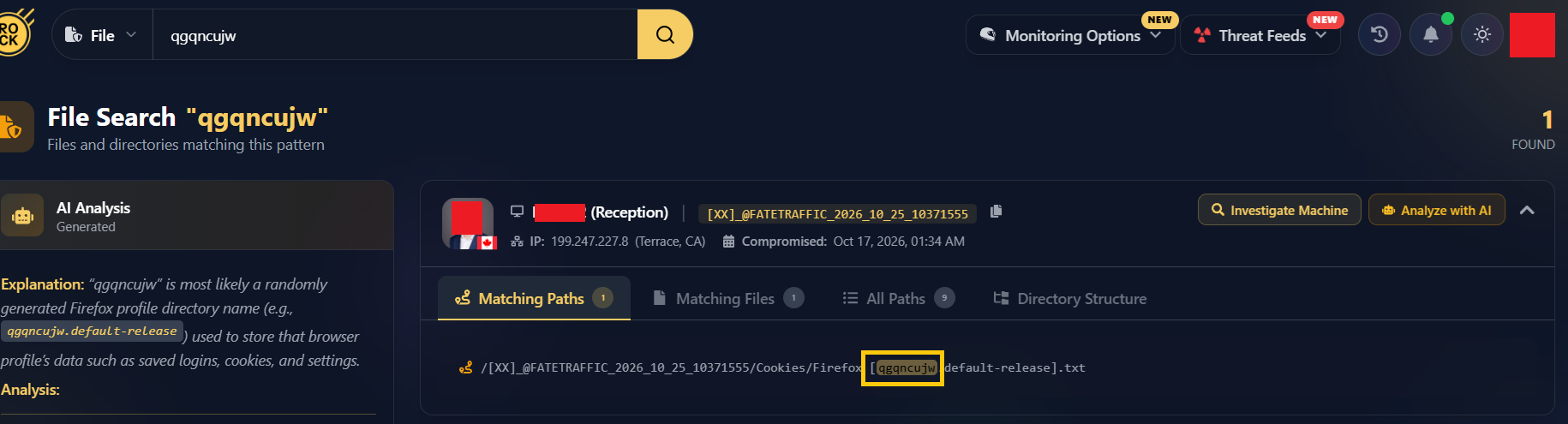
This correlation links an item advertised for sale to compromised-computer data already held by Hudson Rock. It also creates an opportunity to examine the underlying evidence behind the marketplace’s description.
Checking the description against the stolen files
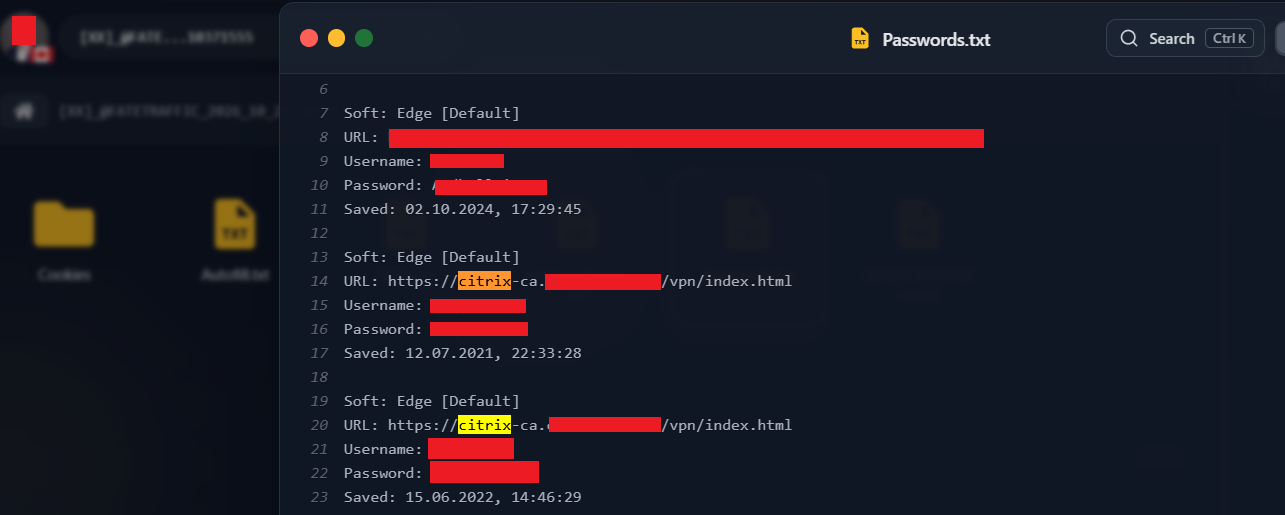
The redacted password records shown in Cavalier contain Citrix-related login URLs. A separate excerpt contains billing-related usernames and application login addresses. Together, these artifacts support parts of the marketplace’s description of a workstation used for administrative activity with saved remote-access credentials.
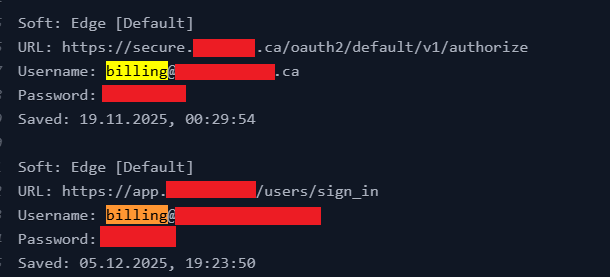
Enki connects the workstation’s role to supporting evidence
Hudson Rock also examined the machine with Enki, its AI agent for infostealer analysis. Asked about the occupation of the machine’s owner, Enki assessed the workstation as being associated with a receptionist or front-desk administrative role.
The response cites specific artifacts: a Reception username in System Information.txt, billing and reception addresses in autofill data, and references to medical-record systems. This supports the machine’s likely function, while leaving open who was using what may have been a shared workstation.
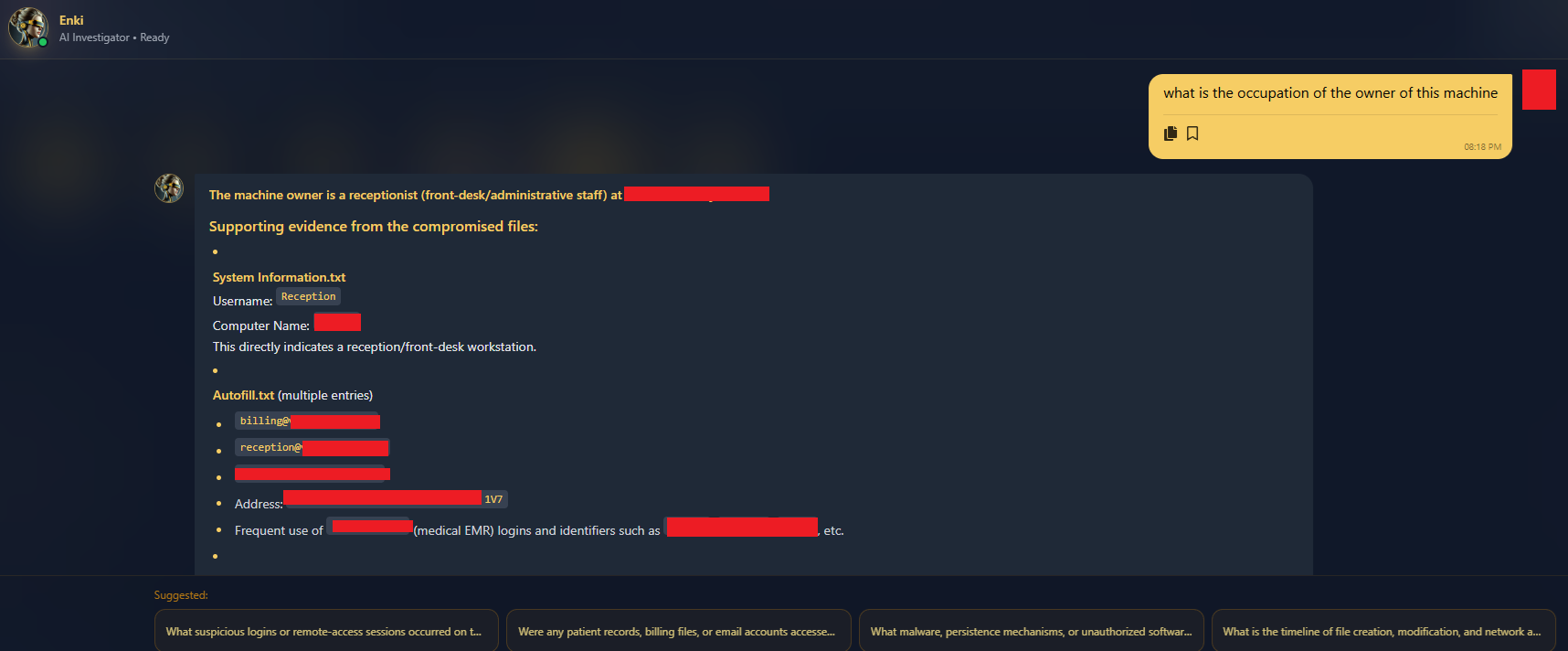
For defenders, that context helps explain why an exposed machine matters: which business processes it supports, which applications appear in its stolen data, and which accounts require investigation. The value comes from connecting the interpretation back to inspectable evidence.
The other listings: professional and personal lives in one profile
Other screenshots show the same approach applied to different alleged victim profiles. Their descriptions combine workplace clues, household activity, financial services, and personal accounts into short narratives. The employment and access claims in these examples are the marketplace’s characterizations.
A defense-contractor household
One $9 listing describes a computer used by a defense-industry contractor and a student. It combines claimed corporate access with banking, gaming, and household activity, assigning the log a score of 100/100 without explaining the scoring method.

A government employee’s family workstation
A $10 listing describes a household machine as belonging to a Washington, D.C. government employee. Its narrative includes government portals, school systems, banking, and personal accounts. Claims about active sessions and immediate account takeover remain assertions in the listing.

An AI researcher’s workstation
Another $10 listing, titled “The AI Researcher’s Workstation Dump,” describes an AI/ML researcher and student in New Delhi, combining professional activity with alleged email, government-portal, financial, and identity-related data. It also claims the log contains “valid Anthropic Claude API session tokens.” This is the seller’s wording; the screenshot does not establish the token type or current validity.

A shared computer can contain traces of several people, and a visit to an organization’s website does not establish employment there. Detailed prose can make these profiles appear more certain than the underlying clues justify. Their significance is the way they organize and advertise stolen material.
Complete logs and individual accounts on the same storefront
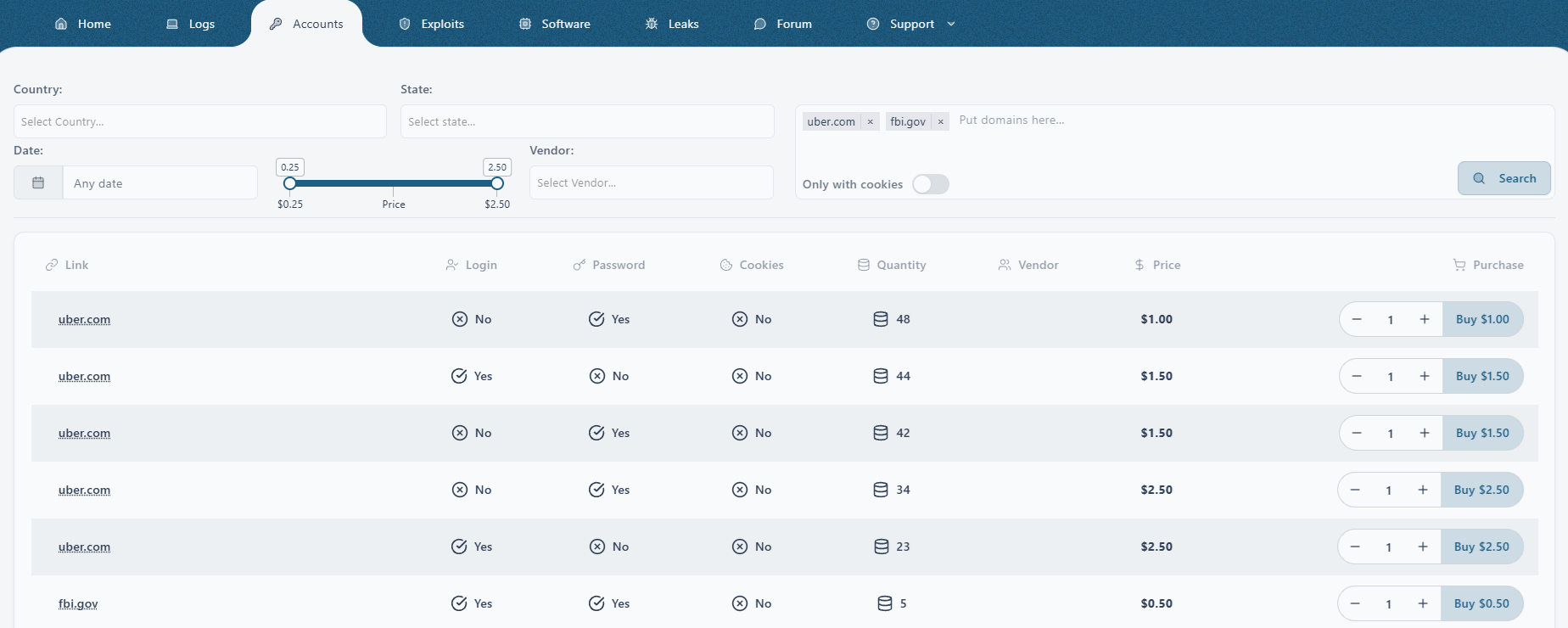
The service also has a separate account-level catalog. Its rows distinguish whether a login, password, or cookies are available and display quantities and prices. This separates individual account records from the complete-machine listings shown elsewhere.
The account search shown below included uber.com and fbi.gov, and returned results for both domains. The screenshot shows multiple Uber-associated rows and a row labeled fbi.gov with a quantity of five. These are domain-associated records advertised by the marketplace; their appearance does not establish that Uber’s or the FBI’s systems were breached, or that the listed credentials remain usable.
That distinction matters when reading the advertisement’s $0.25 starting price: the complete logs illustrated in this investigation are listed at $9 or $10. The screenshots show asking prices, with no basis for inferring completed sales or the value of working access.
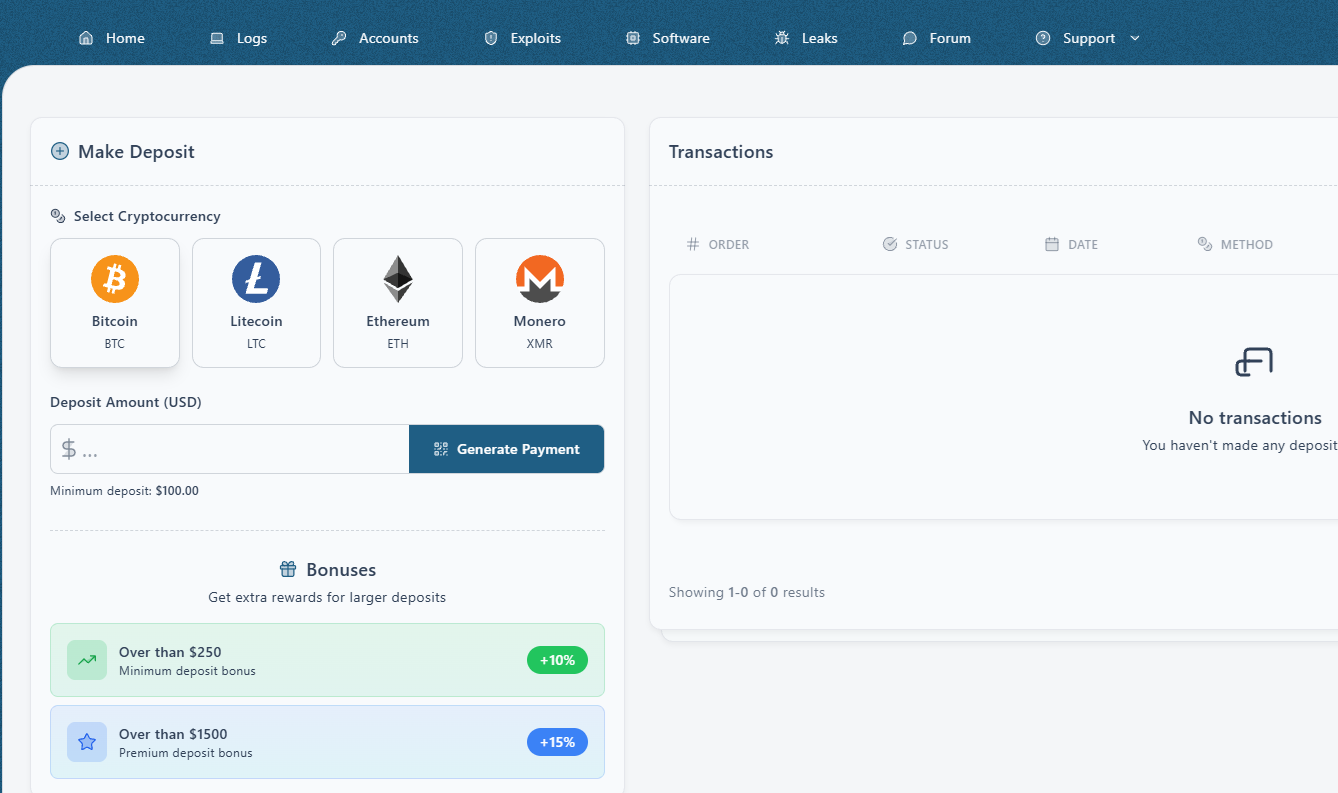
A deposit page advertises cryptocurrency payments, a $100 minimum deposit, and bonuses for larger deposits. These features show how the service presents its commercial model; the captured transaction panel is empty.
Why searchable descriptions matter
Searchable stolen-data markets have a history. The U.S. Department of Justice described Genesis Market as allowing searches by location and account type in 2023. AI-assisted victim analysis also has precedent: Cisco Talos recently documented VOLTA’s use of an LLM to assess stolen material and prioritize victims’ assets. There is no evidence presented here connecting that malware to this service.
What stands out in this investigation is the placement of descriptions and natural-language search directly in the marketplace. The interface makes a machine’s inferred role, industry, and applications part of how its stolen data is discovered and compared.
In Hudson Rock’s assessment, this could reduce the manual work involved in finding relevant logs and recognizing their potential business significance. The screenshots do not measure that improvement or establish how reliably the descriptions perform. They do show how a seller is trying to make large collections of stolen material easier to interpret.
The defensive response starts with the underlying exposure
The corresponding opportunity for defenders is to identify affected machines, understand their role, and close exposed access paths. Microsoft’s token-theft guidance explains why stolen authentication tokens can remain relevant after a user has completed MFA and why containment must address sessions as well as passwords.
- Establish scope. Map the stolen artifacts to affected accounts, applications, and the workstation’s business function. Keep credential-save dates, compromise timestamps, and listing dates distinct.
- Contain and remediate. Address the infected endpoint, reset exposed or reused credentials from a trusted device, and revoke affected sessions and tokens through the relevant services.
- Check for subsequent abuse. Review authentication and audit activity, including unfamiliar sessions, account changes, and access to sensitive resources.
Hudson Rock’s matches show the practical value of maintaining searchable infostealer data: a log offered for sale can be connected to an existing infection record, examined through its source files, and assessed in the context of the organization it may affect. As marketplaces make compromised computers easier to describe and discover, that same context becomes increasingly useful for prioritizing remediation.
Swipe or scroll inside the image to inspect details. Select Close or the dark area to return to the article.
Swipe or scroll inside the image to inspect details. Select Close or the dark area to return to the article.
Swipe or scroll inside the image to inspect details. Select Close or the dark area to return to the article.
Swipe or scroll inside the image to inspect details. Select Close or the dark area to return to the article.
Swipe or scroll inside the image to inspect details. Select Close or the dark area to return to the article.
Swipe or scroll inside the image to inspect details. Select Close or the dark area to return to the article.
Swipe or scroll inside the image to inspect details. Select Close or the dark area to return to the article.
Swipe or scroll inside the image to inspect details. Select Close or the dark area to return to the article.
Swipe or scroll inside the image to inspect details. Select Close or the dark area to return to the article.
Swipe or scroll inside the image to inspect details. Select Close or the dark area to return to the article.